


Renting a car in Texas and not knowing how to handle tolls? You are not alone. Texas has one of the largest cashless toll networks in the country, and driving through without a plan will cost you more than the tolls themselves.
Here is everything you need to know to handle Texas tolls the smart way in 2026.
- What Changed in Texas Tolling for 2026
- How Texas Toll Roads Work (The Basics)
- Your 3 Options for Paying Tolls in a Texas Rental Car
- Third-Party Toll Apps: A Newer Option Worth Knowing
- Toll Roads by Region: What You Will Actually Encounter
- 2026 Toll Rate Snapshot (Two-Axle Vehicles)
- Airport Logistics: What to Expect at Texas Airports
- How to Avoid Double Billing
- What to Do If You Get an Unexpected Charge
- Your Pre-Trip Checklist for Hassle-Free Texas Toll Travel
- A Note on Texas Toll Legislation in 2026
- Ready to Hit the Texas Roads Without the Headaches
What Changed in Texas Tolling for 2026
Before we get into payment options, there is one major update you need to know about. TxTag, formerly managed by the Texas Department of Transportation (TxDOT), has officially moved to the Harris County Toll Road Authority (HCTRA).
As of February 22, 2025, TxTag.org stopped accepting new account registrations. All new accounts are now managed through HCTRA’s EZ TAG system. Existing TxTag stickers still work, but your account and billing now live on the HCTRA platform.
This matters if you are a returning visitor who set up a TxTag years ago. You will need to log into HCTRA’s portal to manage your account.
How Texas Toll Roads Work (The Basics)
Texas toll roads are fully cashless. There are no coin baskets, no cash booths, and no attendants. Every toll plaza uses one of two methods to charge you:
- Transponder read: A radio signal reads the tag on your windshield and bills your account directly.
- License plate capture: Cameras photograph your plate and send an invoice, known as Pay by Mail, to the registered owner.
If you drive a rental car, the rental company owns the plate. That means any unpaid toll gets billed to them first, and then they pass the charge to you along with their own administrative fees.
The good news is that you have three solid options for handling this situation.
Your 3 Options for Paying Tolls in a Texas Rental Car
Understanding your options before you pick up the keys is the most important step you can take.
Option 1: Use the Rental Company’s Toll Program
Every major rental company in Texas offers a toll convenience program. You opt in, and they handle all toll charges automatically using the car’s built-in transponder or license plate recognition.
This is the easiest option, but it is also the most expensive one.
Here is what to know about how each major company charges:
| Rental Company | Fee Model | Notes |
|---|---|---|
| Enterprise | Usage day only | Fee applies only on days you use a toll road |
| National | Usage day only | Same model as Enterprise |
| Alamo | Usage day only | Managed by TollPass |
| Hertz | All-day or unlimited | Fee may apply every rental day once first toll triggers |
| Avis | Varies by location | Check Avis e-toll terms before signing |
| Dollar / Thrifty | All-day model | Managed by PlatePass |

Always ask the counter agent these three questions:
- Is the fee charged per usage day or for every day of the rental?
- Is there a total cap on administrative fees for my trip?
- Can I formally opt out if I plan to use my own transponder?
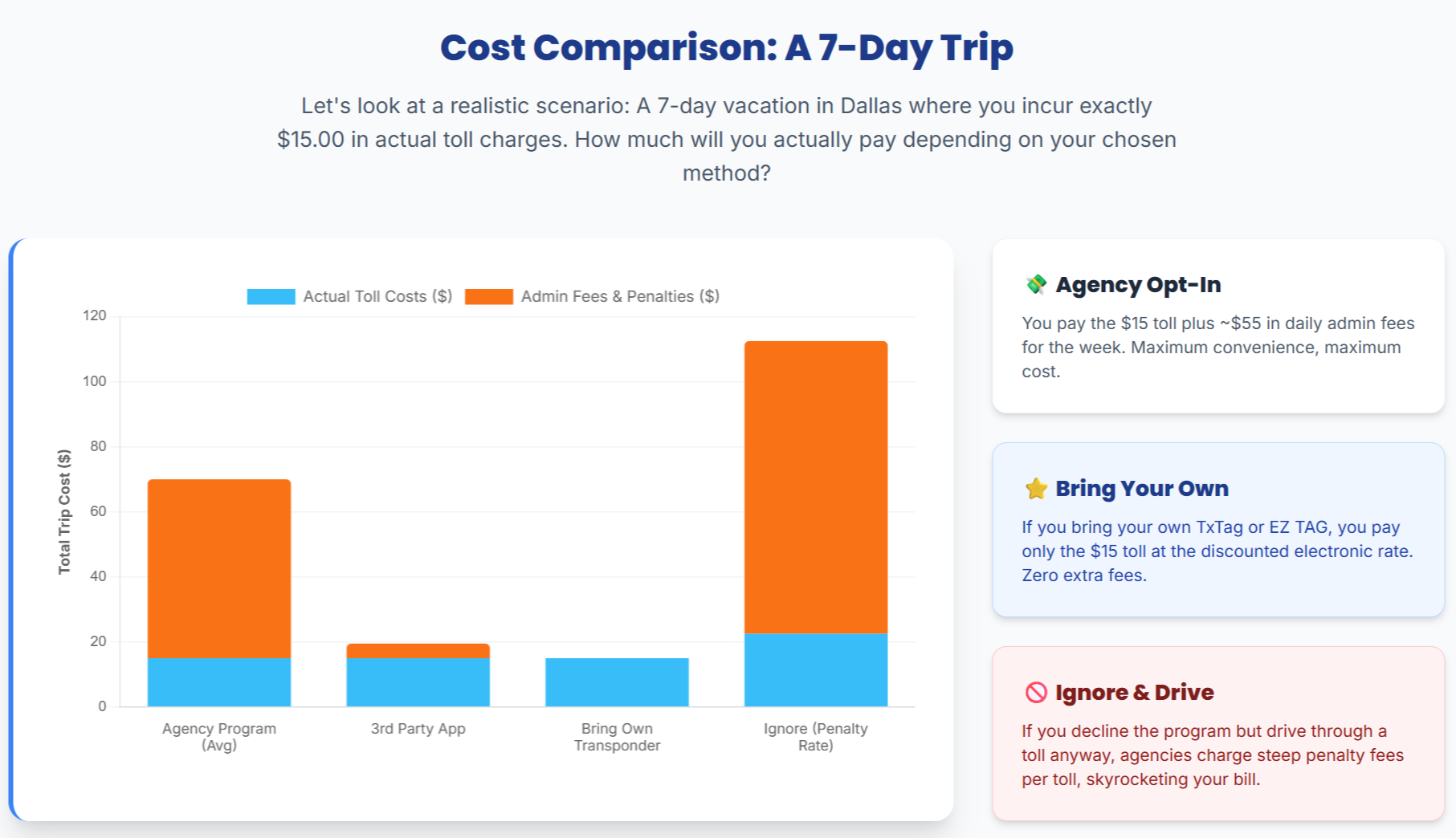
A single missed toll using a pay-by-mail model can turn a $2 toll into nearly $9 after fees. Getting clarity upfront saves you money.
Option 2: Use Your Own Texas Toll Transponder
If you travel to Texas regularly, having your own transponder is the most cost-effective choice. Tag rates are typically 25% to 50% cheaper than Pay by Mail rates billed to rental agencies.
Here are the three main transponders for Texas:
HCTRA EZ TAG (Houston and Central Texas) The EZ TAG now covers what was previously the TxTag network. It works across Houston, Austin, and most of the state. Get your EZ TAG here.
NTTA TollTag (Dallas and Fort Worth) The TollTag is the primary option for the DFW metroplex, including the Dallas North Tollway, President George Bush Turnpike, and Sam Rayburn Tollway. Set up a TollTag here.
All three major Texas tags work across the state under the Central United States Interoperability (CUSIOP) agreement. They also work in Oklahoma, Kansas, and at select facilities in Florida, Colorado, and North Carolina.
To use your tag in a rental car, follow these steps:
- Log into your HCTRA or NTTA account before your trip.
- Add the rental car’s license plate as a temporary vehicle with your trip start and end dates.
- Place your transponder sticker on the windshield behind the rearview mirror.
- Ask the rental counter to formally opt your vehicle out of their fleet toll program.
- Inspect the windshield for any built-in rental transponder and confirm it is in the closed or shielded position.
Warning: If the rental car has a built-in transponder that is active at the same time as your personal tag, you risk being charged twice for the same toll. Always confirm the rental device is deactivated.
Option 3: Pay Tolls Online After Your Trip
Forgot to sort all of this out before hitting the road? You can still pay tolls directly through the relevant agency’s website before the rental company processes the charges.
Here is where to pay based on where you drove:
| Region | Agency | Payment Portal |
|---|---|---|
| Houston area | HCTRA | hctra.org |
| Dallas and Fort Worth | NTTA | ntta.org |
| Austin and Central Texas | CTRMA | mobilityauthority.com |
| Statewide reference | TxDOT | txdot.gov |
Paying directly through the agency is almost always cheaper than letting the rental company handle the invoice. The trick is acting quickly before the charge is forwarded to the rental company’s billing system.
Third-Party Toll Apps: A Newer Option Worth Knowing
A third category of tools has grown significantly in 2026. Apps like Uproad, AutoKinex (formerly Peasy), and NextPass link your credit card to a license plate system that interfaces directly with toll authorities.
These apps offer a “set and forget” experience with no transponder hardware required.
Pros:
- No daily administrative fees from the rental company
- Works using license plate recognition
- Easy to set up on your phone before you travel
Cons:
- Usually bills at the Video or Pay by Mail rate, not the discounted tag rate
- Synchronization delays can sometimes result in the toll being billed to the rental company first, leading to duplicate charges
- Requires careful monitoring during and after your trip
These apps are a reasonable middle-ground option, especially for short trips where you only expect a few tolls.
Toll Roads by Region: What You Will Actually Encounter
Texas toll roads are managed by several regional authorities. Here is a quick breakdown by city.
Houston Area (HCTRA)
Houston’s toll network is operated by the Harris County Toll Road Authority. Key roads include:
- Sam Houston Tollway (Beltway 8): An 88-mile orbital loop connecting the entire metro area
- Hardy Toll Road: Northern bypass with direct airport connector to George Bush Intercontinental Airport (IAH)
- Westpark Tollway and Fort Bend Parkway: Western and southwestern corridors
- Grand Parkway (SH 99): A massive outer loop with eight operational segments spanning seven counties, managed jointly by HCTRA and TxDOT
Dallas and Fort Worth Area (NTTA)
The DFW metro is managed by the North Texas Tollway Authority. Key roads include:
- Dallas North Tollway (DNT): The central spine connecting downtown Dallas to Plano, Frisco, and Prosper
- President George Bush Turnpike (PGBT): East-west connector across the northern suburbs
- Sam Rayburn Tollway (SRT): Links the eastern suburbs to the broader DFW network
- TEXpress Managed Lanes: Dynamically priced lanes on I-635, I-820, and I-35W that can exceed $10 per segment during peak hours
TEXpress lanes are particularly important to know about. Prices float in real time based on traffic demand. A rush-hour trip on the LBJ or North Tarrant Express could cost as much as a full day’s rental fee for a single segment.
Austin and Central Texas (CTRMA and TxDOT)
Austin’s toll roads are managed by the Central Texas Regional Mobility Authority (CTRMA). Key roads include:
- 183 Toll (Manor Expressway): Major corridor into central Austin
- 183A Toll: Williamson County connector with recent rate increases at Lakeline and Crystal Falls plazas
- 71 Toll Lane: Direct access to Austin-Bergstrom International Airport (AUS)
- MoPac Express Lanes: Dynamic pricing lanes running parallel to Loop 1 through central Austin
Important 2026 update: Starting January 1, 2026, CTRMA raised toll rates by 3.01% based on Consumer Price Index adjustments. Pay by Mail rates are now 50% above the base tag rate, plus a $1 processing fee per invoice.
2026 Toll Rate Snapshot (Two-Axle Vehicles)
The pricing gap between having a tag and not having one is significant. Here is a general picture of how rates compare across Texas:
| Payment Method | Rate Level | Extra Fees |
|---|---|---|
| Personal tag (EZ TAG, TollTag) | Lowest base rate | None beyond the toll |
| Rental company toll program | Base rate | Daily admin fee of $3.95 to $9.99 |
| Pay by Mail via agency | 50% above tag rate | $1 per invoice from the agency |
| Pay by Mail via rental company | 50% above tag rate | Admin fee of $5 to $15 per transaction |
A $2 toll processed through a rental company at Pay by Mail rates could realistically cost you $8 to $10 by the time all fees are added. That adds up fast over a week-long trip.
Airport Logistics: What to Expect at Texas Airports
Airports are where most rental car users encounter their first toll, often within minutes of leaving the lot.
DFW International Airport
As of February 1, 2026, DFW Airport went fully digital at all terminal exit plazas. Cash is no longer accepted. Every vehicle passing through is charged by transponder or license plate capture.
Key things to know:
- Vehicles that exit within 8 minutes of entry are charged a $9 pass-through fee
- Beyond 8 minutes, the rate drops to $2 for the first half hour
- NTTA TollTag is the recommended option for the fastest entry and exit
- Pre-booking parking through the DFW app can save up to 50% on parking fees
Houston Airports (IAH and HOU)
At George Bush Intercontinental Airport, all rental operations are at the Rental Car Center, roughly five minutes from the terminals by shuttle. Shuttles run every five minutes from designated doors on each terminal.
Exiting the Rental Car Center puts you almost immediately onto the Hardy Toll Road and Sam Houston Tollway. Both are cashless. Studies from Hertz indicate that around 32% of IAH renters hit these toll roads almost immediately after picking up their car.
At William P. Hobby Airport (HOU), the rental center is a short shuttle ride from Curb Zone 1 at the terminal. Exiting leads directly to the I-45 corridor and south Houston tollways.
Austin-Bergstrom International Airport (AUS)
AUS sits directly on the SH 71 corridor, which features a toll lane. The 2026 rate for this segment is $1.17 for tag users and $1.76 for Pay by Mail. Most rental car users also encounter the 183 Toll or 290 Toll within minutes of leaving the airport.
How to Avoid Double Billing
Double-billing is the most frustrating toll mistake a rental car traveler can make. It happens when two billing signals are generated for the same trip.
Here is how it typically occurs:
- You bring your own transponder
- The rental car also has an active built-in transponder
- Both devices trigger at the same gantry
- Your personal account gets charged and the rental company’s system gets charged too
How to prevent it:
- Locate the rental car’s built-in transponder before you leave the lot (usually behind the rearview mirror or on the dashboard)
- If it is in a sliding box, keep it in the closed or shielded position
- If it is a sticker you cannot remove, do not place your personal tag in the same area
- Take a photo of the windshield and the license plate when you pick up the car
That photo is your evidence if a dispute arises later.
What to Do If You Get an Unexpected Charge
Toll charges from rental trips are notoriously delayed. They often appear on your credit card statement 4 to 8 weeks after you return the car. This happens because plate-based transactions are processed in monthly batches by the toll agencies.
If you see an unexpected charge, here is what to do:
- Find the billing portal. Enterprise, National, and Alamo use TollPass. Hertz, Dollar, and Thrifty use PlatePass. Enter your rental agreement number to see an itemized breakdown.
- Check the dates. Confirm the tolls listed match the actual dates and times of your rental.
- Submit proof of payment. If you paid the same toll through your personal tag or a third-party app, provide the account statement. Request a refund of the duplicate toll and administrative fees.
- Monitor for 60 days. Keep watching your credit card statements for two months after the trip.
Your Pre-Trip Checklist for Hassle-Free Texas Toll Travel
Use this checklist before every Texas rental car trip.
Before You Leave Home:
- [ ] Map your route and identify which toll roads you will use with DriveTexas.org or TxDOT’s toll road guide
- [ ] Log into your HCTRA or NTTA account and add the rental car’s license plate as a temporary vehicle
- [ ] If using a third-party app, confirm your payment method is active and the vehicle is registered
- [ ] Decide which payment option fits your trip (rental program, personal tag, or pay-after)
At the Rental Counter:
- [ ] Ask whether the toll program fee is per usage day or all-day
- [ ] Request a formal opt-out if you are using your own transponder
- [ ] Inspect the windshield for any built-in transponder devices
- [ ] Photograph the windshield, license plate, and rental agreement
After Your Trip:
- [ ] Remove the rental vehicle’s plate from your personal toll account immediately
- [ ] Pay any outstanding tolls directly through the relevant agency portal
- [ ] Check your credit card for 60 days for delayed toll charges
A Note on Texas Toll Legislation in 2026
Texas is going through some interesting changes on the policy side. Legislation passed in 2026 has mandated that TxDOT complete a comprehensive study by September 1, 2026, identifying every state-owned toll road and its projected end date for toll collection.
This signals a longer-term shift toward greater transparency in how toll revenues are managed. It also hints that some older toll roads may eventually transition back to free public highways as their debt is paid off. For now, though, the all-electronic system is firmly in place across the state.
Ready to Hit the Texas Roads Without the Headaches
Paying tolls in a Texas rental car is not complicated once you understand the system. The key is making decisions before you drive, not after.
Pick the option that fits your trip, handle the setup in advance, and you will avoid the frustrating surprise charges that catch so many travelers off guard weeks after they get home. Texas has incredible roads and some seriously good road trip routes. Go enjoy them without the billing drama.

Pavithra Vinoth is the founder of nytollsinfo.com, where she simplifies U.S. toll systems through expert insights and custom-built calculators. Her research-driven tools help drivers avoid costly mistakes and make smarter car decisions.