

Ever check your bank account and notice your E-ZPass took a much bigger bite than you expected? That sudden jump from a polite $35 top-up to a gasp-inducing $100+ charge is a frustratingly common experience. It feels like your toll transponder just gave itself a promotion without asking you.
Here’s the good news: you’re not entirely powerless. You can often change your E-ZPass replenishment amount, or at least understand why it’s gone rogue.
- Quick Start: Get Help Now
- E-ZPass Replenishment 101: Understanding the Basics
- Why Did My E-ZPass Replenishment Amount Go Up?
- How to Change Your E-ZPass Replenishment Amount
- State-Specific Guides: New Jersey and New York
- How to Turn Off E-ZPass Auto-Replenishment
- Pro Tips for Hassle-Free E-ZPass Management
- The Bottom Line
Quick Start: Get Help Now
If you’re in a hurry, the fastest way to address your replenishment issue is to either log into your account online or call your state’s E-ZPass customer service. Here are the numbers for major E-ZPass agencies:
- New Jersey E-ZPass: 1-888-AUTO-TOLL (288-6865)
- New York E-ZPass: 1-800-333-TOLL (8655)
- Pennsylvania E-ZPass: 1-877-736-6727
- Maryland DriveEzMD: 1-888-321-6824
- Massachusetts EZDriveMA: (877) 627-7745
For a complete understanding of your options, keep reading.
E-ZPass Replenishment 101: Understanding the Basics
Before diving into solutions, let’s clarify the key concepts that confuse.
What is E-ZPass Replenishment and How Does it Work?
Two important terms define how your account operates:
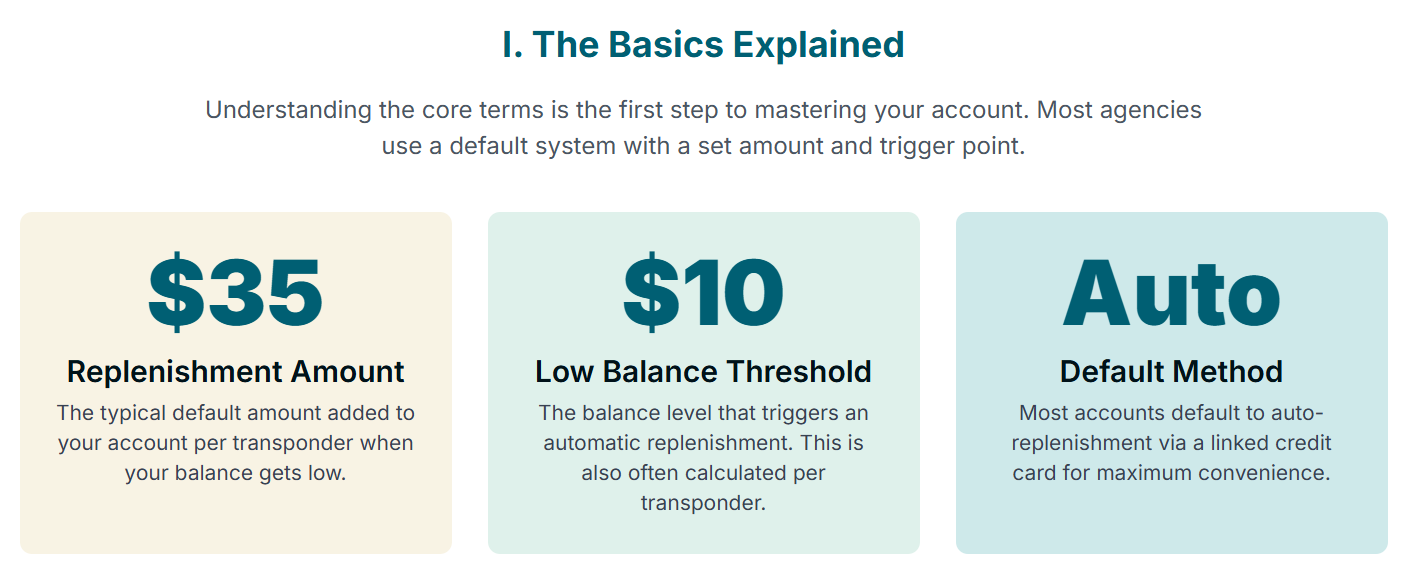
Replenishment Amount:
This is the specific amount of money that gets added to your E-ZPass account when your balance runs low. It might be a fixed sum like $35, or it could be a variable amount based on your average toll usage.
Replenishment Threshold (Low Balance Threshold):
This is the trigger point. When your account balance drops to or below this amount, it automatically triggers a replenishment. For many agencies, this threshold is a flat amount (commonly $10.00 per transponder), though some states like New Jersey use a percentage-based trigger. For example, NJ replenishes when the balance falls below 25% of your replenishment amount.
The process works like this: when you drive through a toll, the cost is deducted from your balance. If that transaction makes your balance hit or fall below the threshold, the system automatically charges your credit card or bank account for the replenishment amount.
When Does E-ZPass Actually Replenish?
Your E-ZPass auto-replenishes the moment your prepaid account balance hits or drops below the low balance threshold.

Example: If your threshold is $10 and your balance is $12, you’re fine. But if you then incur a $3 toll, your balance drops to $9. Since $9 is below the $10 threshold, a replenishment is triggered immediately.
Important Detail: This threshold is often calculated per transponder. If you have three transponders on your account and the threshold is $10, your actual trigger point for the whole account is $30 ($10 x 3). This can make it seem like your account is replenishing way sooner than you expect.
Does E-ZPass Automatically Replenish?
Yes, if you have your account set to automatic replenishment, it will top up without you having to do anything. This is the most common and convenient method, using a linked credit card or bank account.
The alternative is manual replenishment, where you are responsible for monitoring your balance and adding funds yourself.
Why Did My E-ZPass Replenishment Amount Go Up?
This is the number one complaint from E-ZPass users. You’re used to a $35 charge, and suddenly it’s $100. It’s usually not a glitch—your E-ZPass agency intentionally raised the amount.
The Agency’s Logic
Your E-ZPass provider periodically reviews your account. If it sees you’re hitting your low-balance threshold frequently—meaning you’re triggering multiple top-ups in a short time—it decides to “help.”
The logic is that processing fewer, larger transactions is more cost-effective for them. So, the system automatically increases your replenishment amount to a level that should, theoretically, cover your average monthly usage.
The Real Problem: Most agencies, like New Jersey’s, do this without sending you advance notice. You just see the bigger charge after the fact.
How to Change Your E-ZPass Replenishment Amount
You have several options to address this issue, from simple online changes to phone calls with customer service.
General Steps to Change Your Replenishment Amount
Step 1: Try Online First – Log in to your E-ZPass agency’s website. Look for sections with names like “Payments,” “Billing,” or “Replenishment Settings.”
Step 2: Call Customer Service – If the website is confusing or doesn’t give you the option you want, call your agency’s customer service number. Have your E-ZPass account number and security PIN ready.
Can You Lower Your E-ZPass Replenishment Amount?
This is the crucial question, and the answer depends entirely on your state.
States That Allow Full Control
Maryland (DriveEzMD): Offers a “Fixed Replenishment” option where you can input a “Custom Replenishment Amount.” This gives you complete control over the amount.
Massachusetts (EZDriveMA): Provides a simple “edit link” on their website to let you change the replenishment value yourself.
States With Limited or No Control
Indiana: Explicitly states you cannot change the amount because it’s based on your average usage.
New Jersey: Notoriously rigid. Even if customer service grants a “courtesy” reduction, the system’s algorithm often increases it again later based on usage patterns.
What is the Minimum Replenishment Amount?
Most agencies have standard minimum replenishment amounts:
- Pennsylvania: $35 per transponder (triggered at a balance of $15 or less per transponder)
- Massachusetts: $20 minimum opening balance; auto-replenishment is triggered when the balance falls to $10
- Other states: Typically range from $20-$35
You generally cannot set your automatic replenishment amount below these official minimums through standard account settings.
State-Specific Guides: New Jersey and New York
Since these are the most frequently asked-about states, here are specific strategies for each.
How to Change the Replenishment Amount on E-ZPass NJ
The Reality: New Jersey’s policy is to automatically adjust your replenishment amount based on your usage, and they will not notify you before this change occurs. The system does not typically allow you to manually set a custom auto-replenishment amount online.
Your Options:
- Call Customer Service: You may get a one-time “courtesy” reduction, but many users report the system eventually overrides it based on usage patterns.
- Switch to Manual Replenishment: This stops the auto-debits entirely, but puts the responsibility of maintaining a positive balance entirely on you.
How to Change the Replenish Amount on E-ZPass NY
New York offers much better options for users who want control over their replenishment amounts.
Best Solution: Switch to Pay Per Trip (PPT)
The most effective way to eliminate unpredictable replenishment amounts is to switch to the “Pay Per Trip” (PPT) plan. This plan:
- Links directly to your checking account
- Only deducts the exact cost of tolls as you incur them
- Usually processes charges on the same day you travel
- Completely eliminates the need for a large prepaid balance
- Removes the unpredictable replenishment cycle
This system provides the most predictable billing experience available in the E-ZPass network.
How to Turn Off E-ZPass Auto-Replenishment
If you want to stop automatic replenishment entirely, you can switch to manual management.
How to Switch to Manual Replenishment
Log in to your account and change your payment setting from “automatic” to “manual”. Some users have reported removing their credit card information from the account as an alternative method, though this is not the official process.
Important Considerations Before Going Manual
You’re Fully Responsible: You must monitor your balance and add funds before it runs out. Failure to maintain a positive balance results in violation fees.
Loss of Benefits: You may lose perks like waived transponder deposits, which some agencies offer for auto-pay accounts.
E-ZPass Plus Limitations: Programs that allow you to use your transponder for parking often require credit card auto-replenishment, so you’ll likely lose access to these features.
Pro Tips for Hassle-Free E-ZPass Management
Keep Your Information Current
Most Important: Always ensure your license plates and payment information are up to date. If your transponder fails to read, the system uses your license plate to charge your account. If the plate isn’t listed in your account, you’ll receive expensive violation notices.
Monitor Your Account Regularly
Treat your E-ZPass account like a bank account:
- Review Monthly: Log in regularly to check your transaction history
- Catch Errors Early: Look for billing mistakes or unauthorized charges
- Track Usage Patterns: Understanding your driving habits helps you anticipate balance changes
- Notice Changes: You’ll spot if your replenishment amount has been adjusted
Understand E-ZPass Plus Charges
If you use your transponder for parking, remember that larger charges ($20 or more) are billed directly to your credit card, not taken from your prepaid balance. This can appear as an extra replenishment charge if you’re not expecting it.
The Bottom Line
Managing your E-ZPass replenishment successfully requires understanding your specific state’s policies and taking a proactive approach to account management.
While some agencies make surprise adjustments to replenishment amounts, others like New York, Maryland, and Massachusetts offer more user-friendly, flexible options that give you greater control over your billing.
Take Action: Log in to your account today to review your current settings and available options. If you don’t like what you see, contact customer service to discuss alternatives. Remember, these are your transportation costs, and you have the right to understand and influence how they’re managed.

Pavithra Vinoth is the founder of nytollsinfo.com, where she simplifies U.S. toll systems through expert insights and custom-built calculators. Her research-driven tools help drivers avoid costly mistakes and make smarter car decisions.