

Picture this: you’re cruising down the highway, feeling pretty smug about your E-ZPass setup, when suddenly BAM! That dreaded “Invalid Tag” message pops up at the toll booth. Your heart sinks, cars are honking behind you, and you’re wondering if you just became that person who’s about to hold up traffic.
Trust me, we’ve all been there. The good news? Most E-ZPass invalid tag issues are fixable, and I’m here to walk you through exactly what’s going wrong and how to get back on the road without another hiccup.
What Does “Invalid Tag” Actually Mean?
Before we jump into solutions, let’s first understand what’s happening when this message pops up.
Let’s cut to the chase – when your E-ZPass throws an “Invalid Tag” message, it’s the system’s way of saying “Nope, can’t process this right now.” Think of it like your debit card getting declined at the grocery store, except you’re doing 65 mph (well, hopefully slower through the toll plaza).
The system couldn’t authorize your transponder for that specific transaction. Sometimes it’s your fault, sometimes it’s not, but either way, we need to figure out what’s going on.
Ever notice how these things always seem to happen at the worst possible moments? Murphy’s Law strikes again, right?
The Big Four: Top Reasons Your E-ZPass is Acting Up
Now that we know what the message means, let’s dive into the most common culprits behind these frustrating situations. Understanding these root causes will help you troubleshoot faster and get back on the road.

Account Issues (AKA The Usual Suspects)
Starting with the most common problems, account-related issues are responsible for the majority of invalid tag messages you’ll encounter.
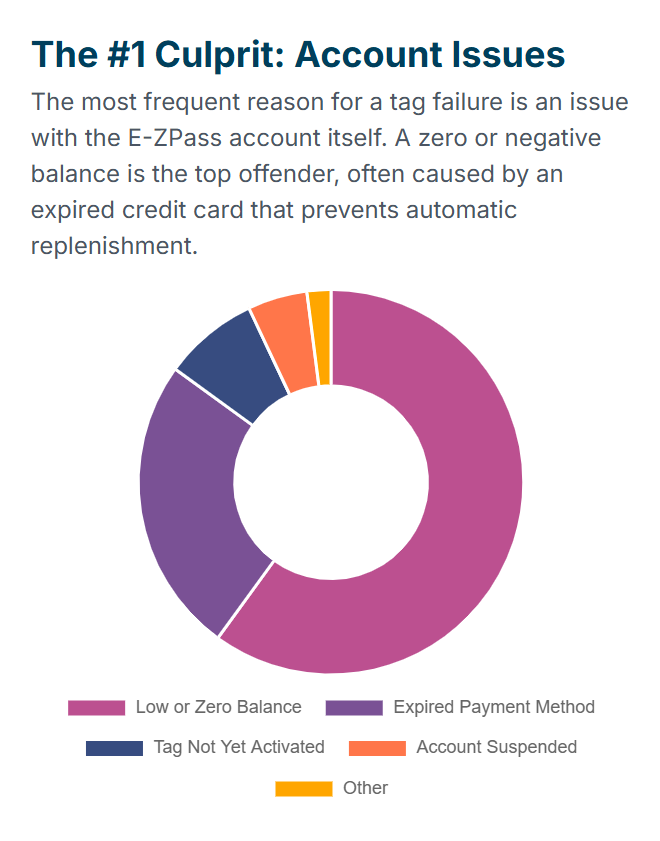
Low or Zero Balance – This is the big one, folks. Your E-ZPass runs on prepaid funds, and when that balance hits zero, your tag becomes about as useful as a chocolate teapot. The system immediately flags your transponder as invalid because, well, there’s no money to cover the toll.
Payment Method Problems – Here’s where it gets sneaky. Maybe your credit card expired, or your bank account info changed, and your automatic replenishment failed. The system tries to top up your account, gets rejected, and boom – you’re driving around with a dead account without even knowing it.
Account Suspension – Yep, they can actually suspend your account. This usually happens if you’ve been consistently late with payments, violated toll road rules, or basically ignored their previous warnings. It’s like getting grounded, but for your transponder.
Tag Not Activated Yet – Got a new tag? Sometimes these things take up to 48 hours to fully activate across all toll systems. Patience, grasshopper.
Transponder Hardware Issues
Moving beyond account problems, sometimes the issue lies with the physical device itself. These hardware-related problems are less common but equally frustrating when they occur.
Dead or Dying Transponder – These little gadgets aren’t immortal. Most last about 10 years or more, depending on usage frequency, and when they start failing, they’ll give you inconsistent reads or just stop working altogether. It’s like when your phone battery starts dying randomly – frustrating but fixable.
Mounting and Placement Problems
Even with a healthy account and working transponder, improper installation can still cause headaches. These positioning issues are surprisingly common and often overlooked.
Wrong Spot on Your Windshield – I can’t tell you how many people stick these things wherever they feel like it. There are actual guidelines, people! Your E-ZPass needs to be mounted correctly to communicate with those overhead readers.
Obstructions – GPS units, dash cams, heavily tinted windows, even snow and ice can mess with your signal. Your transponder needs a clear shot at those toll readers.
Speed Demon Syndrome – Flying through toll plazas at warp speed? The system needs time to read your tag. Slow down a bit – it’s not a race!
External Factors (When It’s Not Your Fault)
Finally, sometimes the problem isn’t on your end at all. While less frequent, infrastructure issues can still cause invalid tag messages.
Faulty Toll Readers – Sometimes, the equipment at the toll plaza is having a bad day. It happens, though thankfully not too often.
Your Step-by-Step Fix-It Guide
Armed with knowledge about what causes these issues, let’s tackle the solutions systematically. We’ll start with quick checks and move to more thorough troubleshooting steps.
Quick Roadside Check (If It’s Safe)
First things first – if you’re still on the road, here’s what you can safely check without creating a dangerous situation.
Pull over safely and take a quick peek at your transponder. Did it fall off the windshield? Has it shifted from its proper position? Don’t try to fix anything while driving – that’s a recipe for disaster.
The Deep Dive (When You Get Home)
Once you’re safely at your destination, it’s time for a more thorough investigation. Most invalid tag issues stem from account problems, so let’s start there.
Check Your Account Balance:
Log in to your E-ZPass account online or through the app. This should be your first stop. Look at:
- Current balance
- Recent transactions
- Any failed replenishment attempts
Update Your Payment Info:
- Verify your credit card hasn’t expired
- Check that your bank account details are correct
- Make sure automatic replenishment is still active
Confirm Your Vehicle Info: Double-check that your license plate information is accurate. Even if your tag isn’t read, many systems use license plate recognition as backup – but only if your plate is properly registered to your account.
Transponder Inspection Time
After ruling out account issues, the next logical step is examining your physical transponder and its installation. This is where many people discover simple but critical problems.
Mounting Check:
Here’s what proper mounting looks like:
- Location: The preferred spot is between the top edge of the windshield (roofline) and the rearview mirror post; if space is limited, mount it directly behind the rearview mirror
- Orientation: E-ZPass label facing you, arrows pointing up
- Attachment: Use those official mounting strips, not tape or suction cups
- Clear Path: No obstructions between the tag and the sky
Age Assessment:
If your transponder is pushing 3-5 years old, it might be time for retirement. These devices have batteries that eventually die, and when they do, your tag becomes unreliable.
When to Get a New Transponder
If your troubleshooting points to hardware failure, don’t worry – getting a replacement is straightforward. Here’s how to recognize when it’s time and what to do about it.
Red Flags That Scream “Replace Me”:
- Consistent invalid tag messages despite a healthy account
- Your transponder is 8 or more years old
- Physical damage to the device
- Intermittent reading issues
How to Get a Replacement:
- Online: Most agencies let you order replacements through their website
- Phone: Call your E-ZPass customer service line
- In-Person: Visit a customer service center or participating retailer
Pro tip: Defective transponders are often replaced free if they fail within the warranty period, 10 years for the standard E-ZPass and 7.5 years for the E-ZPass Flex. If your battery dies, you can typically mail the device in for a free replacement.
Contacting Customer Service Like a Pro
When self-troubleshooting doesn’t solve the problem, it’s time to call in the experts. However, a little preparation can make this process much smoother and more effective.
When you need to call for help, come prepared:
Have This Info Ready:
- Your account number
- Transponder number
- License plate number
- Date, time, and location of the incident
- Exact error message
- What you’ve already tried
Key Phone Numbers:
- Virginia E-ZPass: 1-877-762-7824
- PA Turnpike E-ZPass: 1-877-736-6727
- NJ E-ZPass: (888) AUTO-TOLL
- We have a dedicated post covering all E-ZPass customer service phone numbers
Remember, you need to contact the agency that issued your transponder, not necessarily the one where you had the problem.
Prevention is Better Than Cure
Rather than constantly fighting fires, let’s focus on preventing these issues from happening in the first place. A few simple habits can save you tons of frustration down the road.
Set Up Automatic Replenishment:
This is honestly the best thing you can do. Set it up once, and your account automatically tops up when it gets low. No more surprise zero balances!
Monthly Account Check-ups:
Spend five minutes each month reviewing your account. Check your balance, verify your payment info is current, and make sure your vehicle information is accurate. It’s like a quick health check for your E-ZPass.
Keep Your Tag Happy:
- Mount it correctly and leave it alone
- Keep the area around it clear
- Don’t expose it to extreme temperatures
- Replace it when it gets old
What Happens If Things Go Wrong?
Despite your best efforts, sometimes problems still occur. Understanding the consequences helps you respond appropriately and minimize any financial impact.
Violation Notices:
If your tag isn’t read and the system can’t charge your account, you’ll probably get a violation notice in the mail. These come with fees that can add up quickly, so don’t ignore them.
Toll By Plate:
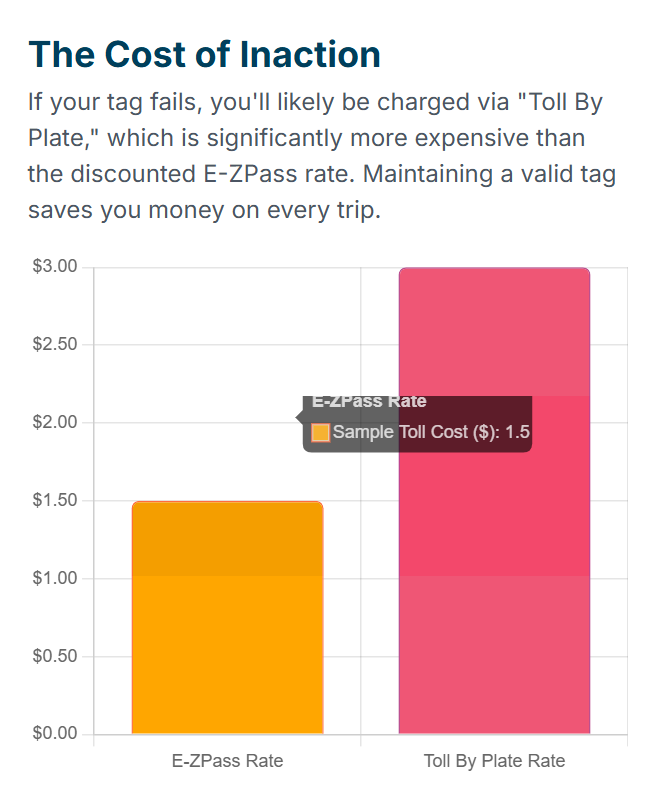
Many roads now use license plate recognition as backup. However, these rates are usually much higher than E-ZPass rates. For example, some tolls might be $1.50 with E-ZPass but $3.00 with Toll By Plate.
The Bottom Line
After covering all these troubleshooting steps and prevention strategies, let’s wrap up with the key takeaways that will keep you cruising smoothly through toll plazas.
Look, dealing with E-ZPass issues is never fun, but most problems are totally solvable. The vast majority of “Invalid Tag” messages come down to account balance issues or mounting problems – both of which are easy fixes once you know what you’re doing.
My advice? Don’t panic when you see that dreaded message. Follow the troubleshooting steps, be proactive with your account maintenance, and remember that customer service is there to help when you need it.
Keep your account funded, your transponder properly mounted, and your vehicle info up to date. Do that, and you’ll cruise through toll plazas like the smooth operator you were meant to be.

Pavithra Vinoth is the founder of nytollsinfo.com, where she simplifies U.S. toll systems through expert insights and custom-built calculators. Her research-driven tools help drivers avoid costly mistakes and make smarter car decisions.