

Got a shiny new ride sitting in your driveway? Or maybe you’re staring at that rental car, wondering if your E-ZPass will work without breaking the bank? Trust me, I’ve been there, and nothing ruins the excitement of a new car quite like getting slammed with violation notices because you forgot to update your E-ZPass info.
Here’s the deal: you can update your E-ZPass online, through mobile apps, or by phone in just a few minutes. The key is doing it BEFORE you hit your first toll booth. After dealing with my own E-ZPass headaches (and helping friends avoid theirs), I’ve learned the ins and outs of managing these accounts like a pro.
Audio more your style? Tap below to start listening.
Why Your E-ZPass Account Matters More Than You Think
Look, I get it. E-ZPass feels like one of those “set it and forget it” things, right? Stick the transponder on your windshield, link a credit card, and you’re golden. But here’s what nobody tells you: the system is only as good as your account information.
Think about it this way – when you cruise through that toll gantry at 65mph, the system has milliseconds to read your transponder, match it to your account, find your vehicle info, and charge the right amount. If any piece of that puzzle is missing or wrong, you’re suddenly looking at violation notices with fees that’ll make your wallet weep.
I learned this the hard way when I bought my current car. Forgot to update my account for exactly three days. Three! Those three days cost me $150 in administrative fees because my old license plate wasn’t linked anymore. The violation notices came faster than my new car registration.
The frustrating part? Modern tolling authorities are getting stricter about this stuff. They’re jacking up penalties and introducing new fee structures that punish you for any account errors. Some places now charge different rates if your transponder isn’t mounted properly – we’re talking serious money here.
Adding Your New Vehicle: The Step-by-Step Breakdown
Alright, let’s talk about actually updating your account. Most E-ZPass agencies make this pretty straightforward, but there are some tricks to make it smoother.
The Essential Info You’ll Need
Before you start, grab these details:
- Your new vehicle’s license plate number (obvious, but worth mentioning)
- Make, model, and year of the car
- Your driver’s license info (some agencies ask for this)
- Vehicle identification number (VIN) for some providers
Three Ways to Update Your Account
Online Portal (My Personal Favorite)
Most states have pretty decent online account management now. I’m partial to Pennsylvania’s system – their PA Toll Pay setup lets you add vehicles, check balances, and even upload photos of license plates. Super convenient when you’re dealing with rental cars.
For New York users, the E-ZPass NY website is solid too. Log in, hit the vehicle management section, and you’re basically filling out a digital form. Takes maybe five minutes if you’ve got all your info ready.
Mobile Apps (Perfect for Last-Minute Updates)
Here’s where technology actually makes life easier. Apps like PA Toll Pay let you literally snap a photo of a license plate to add it to your account. Game-changer when you’re standing in a rental car lot and suddenly remember you need to update your E-ZPass.
The Tolls NY app does similar stuff for New York accounts. Honestly, these apps have saved my butt more times than I care to admit. Nothing beats being able to update your account from your phone while you’re literally sitting in the car.
Phone Support (Old School but Reliable)
Sometimes you just need to talk to a human, and that’s totally fine. Every E-ZPass agency has customer service lines. Yeah, you might sit on hold for a bit, but the reps usually know their stuff and can walk you through any weird account issues.
Pro tip: Call during off-peak hours (mid-morning or early afternoon) and you’ll get through faster.
The Critical Step Everyone Forgets
Here’s what trips up most people: removing your old vehicle from the account. I can’t stress this enough – if you sold your car, traded it in, or returned a lease, that vehicle info needs to come OFF your E-ZPass account immediately.
Why? Because if the new owner drives through a toll with your old transponder still in the car (or if the license plates somehow stay linked), guess who’s getting charged? Yep, you. I’ve seen people get stuck paying for tolls on cars they haven’t owned for months.
The removal process is usually the same as adding – online, app, or phone. Just make sure you do it the same day you get rid of the vehicle.
E-ZPass and Rental Cars: Your Money-Saving Game Plan
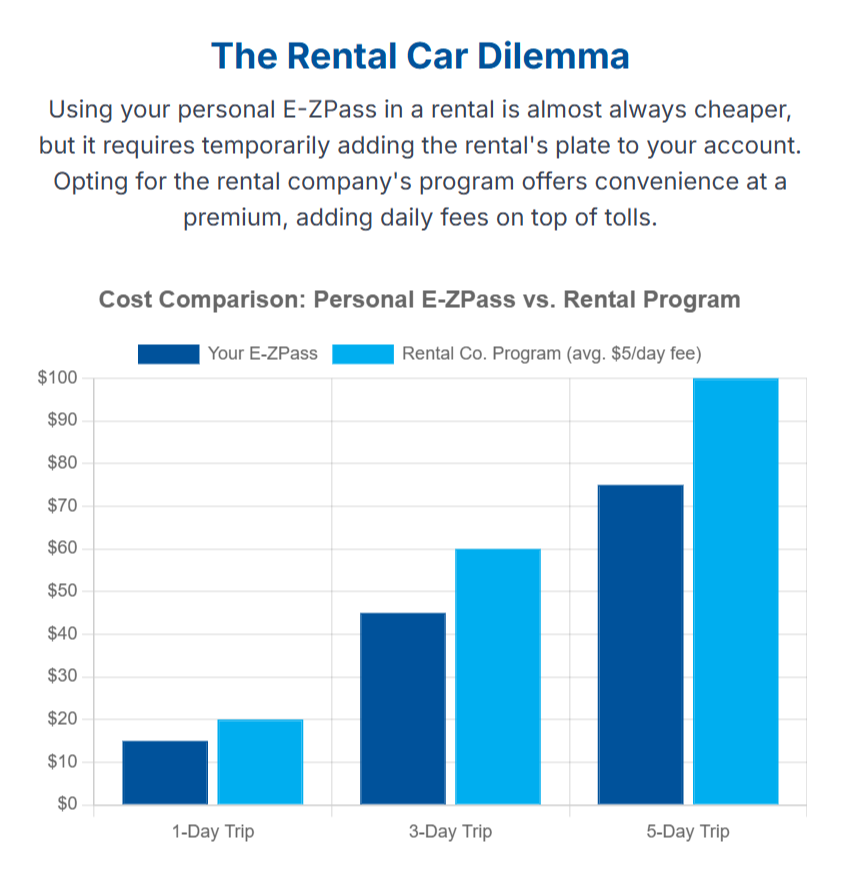
Rental cars are where E-ZPass gets tricky, but also where you can save serious cash if you play it right. Most rental companies want to charge you their own toll fees, and trust me, those rates are brutal.
Before You Drive Off the Lot
Step 1: Add the Rental to Your Account
Most E-ZPass agencies let you temporarily add rental vehicles. You’ll need the license plate, make, and model – all stuff that should be on your rental agreement. The keyword here is “temporarily.” Set yourself a phone reminder to remove it when you return the car.
Step 2: Deal with the Rental Company’s Transponder
Here’s something that caught me off guard the first time: many rental cars have their own E-ZPass transponders in little lead boxes on the windshield. If you’re using your personal E-ZPass, you need to make sure the transponder stays sealed in that box. Otherwise, both devices might get read and you could end up paying twice.
Why Rental Company Toll Programs Are Usually a Ripoff
Let me break down the math on this because it’s eye-opening. Most rental agencies charge a daily service fee for their toll program – usually around $5 to $15 or more per day, depending on the company and location – PLUS the actual toll costs. And here’s the kicker: they often charge you the higher “video toll” rate instead of the discounted E-ZPass rate.
So on a five-day rental, you might pay $25 in service fees alone, before any actual tolls. Compare that to using your own E-ZPass, where you pay zero extra fees and get the discounted rates. The savings add up fast, especially on longer trips.
Enterprise’s Policy (They’re Actually Pretty Reasonable)
Enterprise is one of the better rental companies for this. They don’t charge extra fees if you use your own E-ZPass, but they do recommend checking with your E-ZPass provider to make sure the rental vehicle is properly registered. Smart advice.
Other companies can be more aggressive about pushing their toll programs, so read your rental agreement carefully and don’t be afraid to ask questions at the counter.
Rental Trucks: A Whole Different Beast
Planning a move with a U-Haul or Penske truck? Your regular passenger car E-ZPass might not work properly. These trucks often have different axle configurations and weight classes, which means different toll rates.
Using a regular E-ZPass in a commercial vehicle can actually get you in trouble for underpaying tolls. The system might initially charge you the car rate, but when they audit the transactions (and they do), you’ll get hit with violation notices for the difference plus penalties.
What Happens When You Mess Up (And How Bad It Gets)
Let’s talk about the consequences of outdated E-ZPass info, because they’re getting nastier every year. Tolling authorities are basically using financial pain to force people into compliance.
Violation Notices: The Gift That Keeps on Giving
Miss a toll because your transponder wasn’t read and your license plate isn’t in the system? You’re looking at the unpaid toll PLUS administrative fees that can hit $50 per incident in some states. I’ve seen single trips turn into $100+ bills because of this stuff.
The New “Middle Tier” Tolls
Here’s something that might surprise many drivers. Starting July 6, 2025, the Port Authority, which operates crossings like the George Washington Bridge and the Lincoln Tunnel, introduced a new mid-tier toll rate. As of January 2026, that rate is $19.55 and applies to E-ZPass users whose transponders are not properly mounted or cannot be read.
This is separate from their regular E-ZPass rate ($14.79 off-peak / $16.79 peak) and their toll-by-mail rate ($23.30). Basically, they’re creating a penalty tier specifically for people who have E-ZPass but aren’t using it correctly.
Toll-by-Mail Rates Are Going Through the Roof
Speaking of those toll-by-mail rates – they’re getting insane. The Port Authority is jacking their rate up to over $22 for what would normally be a $14 E-ZPass toll. That’s roughly a 39–58% premium over E-ZPass rates, depending on time of day.”
Pennsylvania made similar moves when it launched Open Road Tolling in January 2025, with a full statewide rollout expected in 2027. The message is clear: have a working E-ZPass or pay through the nose.
Pro Tips for Hassle-Free E-ZPass Management
After years of dealing with this stuff, here are my best strategies for staying out of trouble:
Set Up Account Alerts
Most E-ZPass agencies offer email or text alerts for low balances, failed payments, or account issues. Turn these on! I get a text when my balance drops below $10, which has saved me from violation notices more times than I can count.
The Monthly Account Check
I’ve made it a habit to log into my E-ZPass account once a month, usually when I’m paying other bills. Quick scan of recent transactions, make sure all my vehicles are still listed correctly, and verify my payment method is current. Takes two minutes but prevents major headaches.
Mount Your Transponder Like Your Life Depends on It
With these new penalty rates, proper transponder mounting isn’t optional anymore. Follow the instructions exactly – usually behind and to the right of your rearview mirror, at least an inch below any tinted area. The E-ZPass logo should face you, right-side up.
If you’ve got a fancy windshield with a metallic coating or lots of electronic gadgets, you might need special mounting instructions. Call your E-ZPass provider if the standard position doesn’t seem to work.
Create a “New Car Checklist”
I keep a note in my phone with all the stuff I need to do when I get a new vehicle. “Update E-ZPass” is right at the top, along with insurance, registration, and all that other fun stuff. Having it written down means I don’t forget in the excitement of a new car.
Keep Receipts for Problem Trips
If you ever hit a toll and aren’t sure your E-ZPass was read properly, keep any receipts or take a photo of your transponder showing it was properly mounted. This documentation can help if you need to dispute charges later.
The Bottom Line: Stay Proactive or Pay Extra
Look, E-ZPass used to be pretty forgiving. Made a mistake? No big deal, pay the toll plus a small fee and move on. Those days are ending fast.
The new reality is this: tolling authorities are using financial pressure to force compliance. They want everyone using E-ZPass correctly, and they’re making the alternatives expensive enough that you’ll have no choice but to get your act together.
The good news? Managing your E-ZPass properly isn’t rocket science. Update your account when you get new vehicles, mount your transponder correctly, keep your payment info current, and stay informed about changes in your area. Do these things consistently, and you’ll cruise through tolls without worry.

Pavithra Vinoth is the founder of nytollsinfo.com, where she simplifies U.S. toll systems through expert insights and custom-built calculators. Her research-driven tools help drivers avoid costly mistakes and make smarter car decisions.