

Need to find your E-ZPass balance right this second? You must log into the specific state website that issued your transponder, like e-zpassny.comfor New York, or call their direct line at 1-800-333-8655.
A universal E-ZPass portal simply does not exist in 2026. So, you must visit your home state’s official portal or download their official mobile app to see your available funds.
TL;DR: Quick Reference Directory
Need your state’s portal fast? Bookmark this complete cheat sheet for every issuing E-ZPass state:
| State | Official Website | Customer Service Phone |
| Delaware | ezpassde.com | 1-888-397-2773 |
| Illinois | getipass.com | 1-800-824-7277 |
| Maine | ezpassmaineturnpike.com | 1-888-682-7277 |
| Maryland | driveezmd.com | 1-888-321-6824 |
| Massachusetts | ezdrivema.com | Check Website |
| New Hampshire | ezpassnh.com | Check Website |
| New Jersey | ezpassnj.com | 1-888-288-6865 |
| New York | e-zpassny.com | 1-800-333-8655 |
| North Carolina | ncquickpass.com | Check Website |
| Ohio | ezpassoh.com | 1-440-234-2081 |
| Pennsylvania | paturnpike.com/e-zpass | 1-877-736-6727 |
| Virginia | ezpassva.com | 1-877-762-7824 |
| West Virginia | transportation.wv.gov/Turnpike | 1-800-206-6222 |
Step 1: Identify Your Issuing State
Do you know which specific state agency issued your transponder? You absolutely need this information before you do anything else.
Why Your State Matters
Every state maintains a completely independent billing system and website. New York customer service agents cannot access your New Jersey account, and vice versa. Because of this, you must interact exclusively with the state that handed you the hardware.
Let’s be real—this fragmented setup frustrates almost everyone. However, knowing your specific home agency remains the mandatory first step to accessing your money.
How to Find Your Issuing Agency
Not sure who issued your tag? Check these two physical clues:
- The Logo: Look for the specific agency logo printed right on the front of the transponder.
- The Serial Number: Check the first three digits of the serial number, which usually indicate your home state’s code.
Step 2: Access the Official Web Portal
Once you identify your issuing state, you need to visit their official website. Always type these exact URLs directly into your browser. Relying on search engines often leads you straight to third-party data scrapers that want to harvest your credit card info.
Official State Portals Directory
Use this table to find your exact login destination and learn about specific state requirements:
| State | Login Notes & Quirks |
| Delaware | Replenishes based on your average monthly toll usage instead of a flat rate. |
| Illinois | Displays your available balance immediately at the top of the dashboard. |
| Maine | Low balance thresholds vary based on how many transponders you own. |
| Maryland | Log in using a custom username or transponder serial number. |
| Massachusetts | Heavily targeted by third-party scam apps, so verify the official URL! |
| New Hampshire | Standard portal for balance inquiries and transponder requests. |
| New Jersey | Requires you to solve a picture CAPTCHA before logging in. |
| New York | Log in using your account number and PIN. |
| North Carolina | Integrated with the NC Quick Pass program for localized discounts. |
| Ohio | Requires a $25 initial deposit; auto-charges when you drop to $10. |
| Pennsylvania | Provides an excellent breakdown of all recent highway charges. |
| Virginia | Allows you to quickly configure manual or automatic replenishments. |
| West Virginia | Direct access for balance management and violation support. |
$$Insert Screenshot of a standard state E-ZPass Dashboard showing a clear account balance$$
Step 3: Download the Correct Mobile App
Want to check your balance while sitting in the passenger seat? You definitely need a mobile app. However, navigating the app stores requires serious caution.
The Third-Party App Trap
The Apple App Store and Google Play Store currently host dozens of unofficial, scammy applications. Sneaky developers publish apps with deceptive names like “EZ Tolls MA” or “EZ Tolls VA.”
These unofficial apps secretly slap a $1.29 to $2.50 processing fee onto every single account replenishment. Why would anyone voluntarily pay a developer a ransom just to load twenty dollars into their own account?
Official First-Party Apps Directory
You must only download the official applications published by the actual state agencies. These guarantee absolute security and never charge hidden maintenance fees. If your state isn’t listed with an app, you must use their web portal.
| State | Official App Name | Best Feature & Notes |
| Delaware | No Official App | Must use the web portal to manage account. |
| Illinois | Official Illinois Tollway App | Executes rapid fund transfers instantly. |
| Maine | No Official App | Must use the web portal to manage account. |
| Maryland | DriveEzMD Mobile App | Seamlessly manages both transponder and video tolls. |
| Massachusetts | No Official App | Must use the web portal to manage account. |
| New Hampshire | NH E-ZPass App | Full mobile access for transponder requests and invoice payments. |
| New Jersey | NJ E-ZPass | Features Apple Pay, Google Pay, and camera plate scanning. |
| New York | Tolls NY | Tracks your detailed toll history perfectly. |
| North Carolina | NC Quick Pass | Allows you to digitally declare HOV status for toll exemptions. |
| Ohio | No Official App | Must use the web portal to manage account. |
| Pennsylvania | PA Toll Pay | Direct interface for auditing toll charges on the go. |
| Virginia | No Official App | Must use the web portal to manage account. |
| West Virginia | No Official App | Must use the web portal to manage account. |
Step 4: Call the Automated Phone Systems
What if you lack internet access or experience a smartphone glitch on the road? You can instantly check your balance using legacy telephonic systems. Every state operates a 24/7 Interactive Voice Response (IVR) phone line.
Follow these quick steps to get your balance via phone:
- Dial the Number: Call your specific state’s 1-800 customer service line.
- Follow Prompts: Navigate the automated voice menu (usually by pressing ‘1’ for account management).
- Enter Details: Type your account number and PIN using your touch-tone keypad.
- Listen or Pay: The automated voice reads your exact balance. You can also process a secure credit card payment during this exact call.
Crucial Action: Enable Automatic Replenishment
Do you remember slowing down at physical toll booths and looking for a green “Paid” or yellow “Low Balance” light? You can forget about that completely.
The End of Physical Warnings
Almost all major highways now use Open Road Tolling (ORT). You blast under high-speed sensors at seventy miles per hour, meaning the roadway gives you zero physical warning when your account runs dry.
Why You Need Auto-Pay
You must log into your web portal and link a primary credit card for automatic replenishment. The system then monitors your funds and automatically charges your card whenever your balance drops below the state’s minimum threshold.
If you ignore this step, you will face severe consequences:
- Depleted Accounts: Your transponder stops paying the tolls.
- Toll Violations: The state treats you like a toll violator.
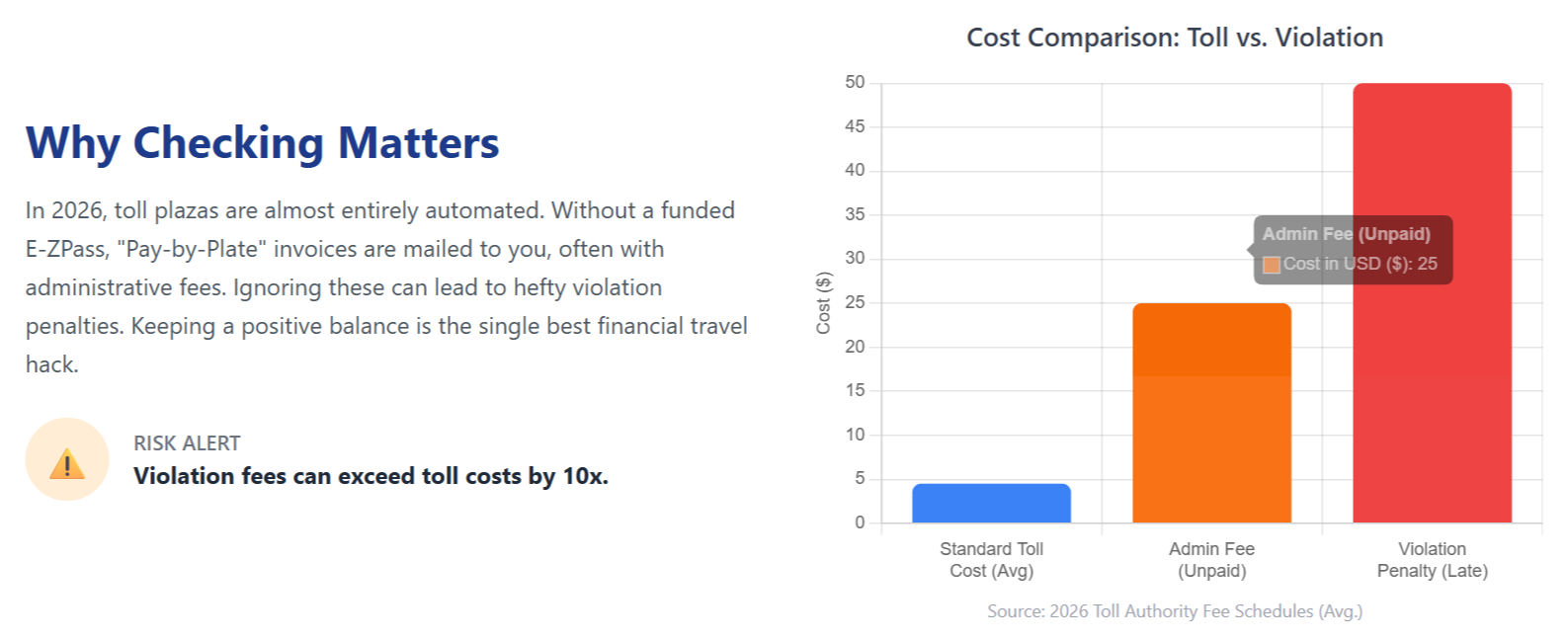
- Expensive Invoices: You receive massive Toll-By-Plate invoices in the mail, stripping away all your E-ZPass discounts.
Warning: Ignore the “Smishing” Toll Texts
Have you received a terrifying text message claiming you owe a massive toll fine? Delete it immediately. Cybercriminals currently orchestrate massive text message campaigns targeting drivers across the country.
Spotting a Fake Toll Text
A classic scam text looks exactly like this:
“E-ZPass final reminder: You have an outstanding toll. Your toll account balance is outstanding. If you fail to pay by March 16, 2026, you will face penalties or legal action. Click here to pay.”
These scammers claim the state will suspend your driver’s license unless you click their link and pay an overdue balance.
Official Agency Rules
Don’t fall for the trap. Remember these core truths about toll collections:
- No Text Demands: Official tolling agencies never text you to demand immediate payment or enforce violations.
- Secure Channels Only: Genuine agencies send violation notices strictly through secure email or physical postal mail.
- Data Theft: If a text message demands money, it represents a guaranteed scam attempting to harvest your credit card data.
To verify any legitimate debts, close your text app immediately. Manually type your state’s official web portal URL directly into your browser and check your dashboard.
Securing Your Highway Command Center
Checking your electronic toll balance requires zero guesswork if you follow the right steps. Keep these final takeaways in mind:
- Locate your issuing state.
- Bookmark their official web portal.
- Download their verified mobile app.
- Link a secure credit card for auto-replenishment.
A properly funded account keeps your highway travels completely frictionless and protects your wallet from massive out-of-state penalties. You stay off the violation lists and capture the best local discounts effortlessly. Now go verify your balance, top up those funds, and enjoy the drive!

Pavithra Vinoth is the founder of nytollsinfo.com, where she simplifies U.S. toll systems through expert insights and custom-built calculators. Her research-driven tools help drivers avoid costly mistakes and make smarter car decisions.